Android Install Process Instructions
The process for Android Installation of the Scanit Beta App is as follows:
- First, open the download link to install Beta by Crashlytics app on the mobile device.
- This app is required to enable our Beta testing metrics.
- You will then be prompted make a one-time settings change allowing the Installation of the app by Unknown Sources (as opposed to the Android store).
- Upon installation of Beta by Crashlytics, you will see the invitation to install the latest version of the Scanit Reader.
- You will be prompted to make the same one-time settings change once again, allowing Unknown Sources for the Scanit app download.
- Note that allowing these one-time installations will not compromise your device security in any way.
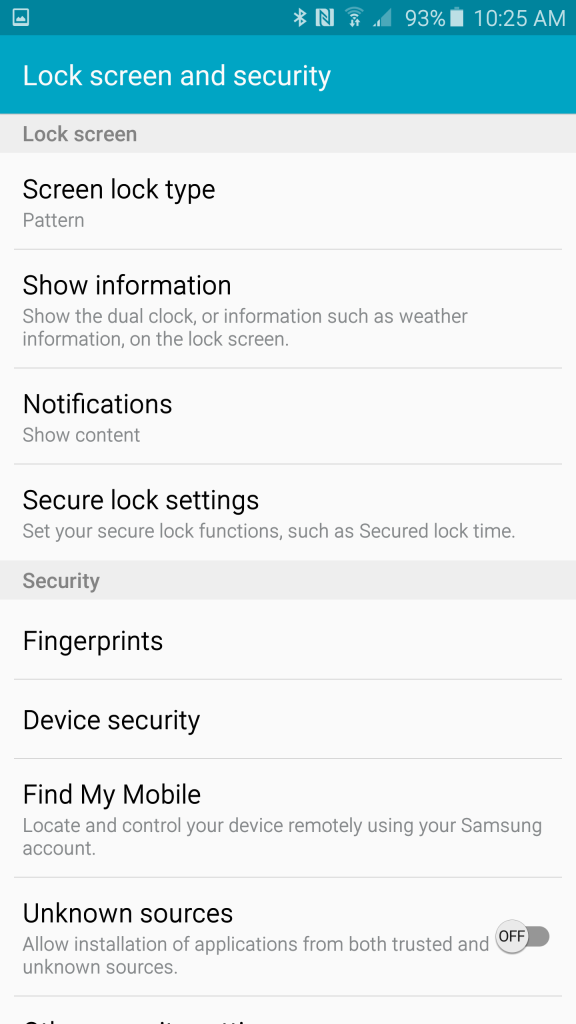
In Settings, allow one time installation of application from Unknown Sources.

After installing Beta by Crashlytics, you will select the link to download and install the Scanit app.
Iphone Install Process Instructions
The process for Apple Installation of the Scanit Beta App is as follows:
- Upon submitting the form requesting the Scanit iPhone app download we will be notified of your request and will respond within 24-48 hours with an Apple authorization code for your install.
- You must accept the code on the mobile device.
- At this time, the download link will appear and you can download the Scanit app.